Do you understand the significance of your investor profile and know where to easily access valuable information? The Ronda Investment Portal underwent comprehensive optimization some time ago. We would like to guide you on how to efficiently search for crucial information and navigate through the application's contents.
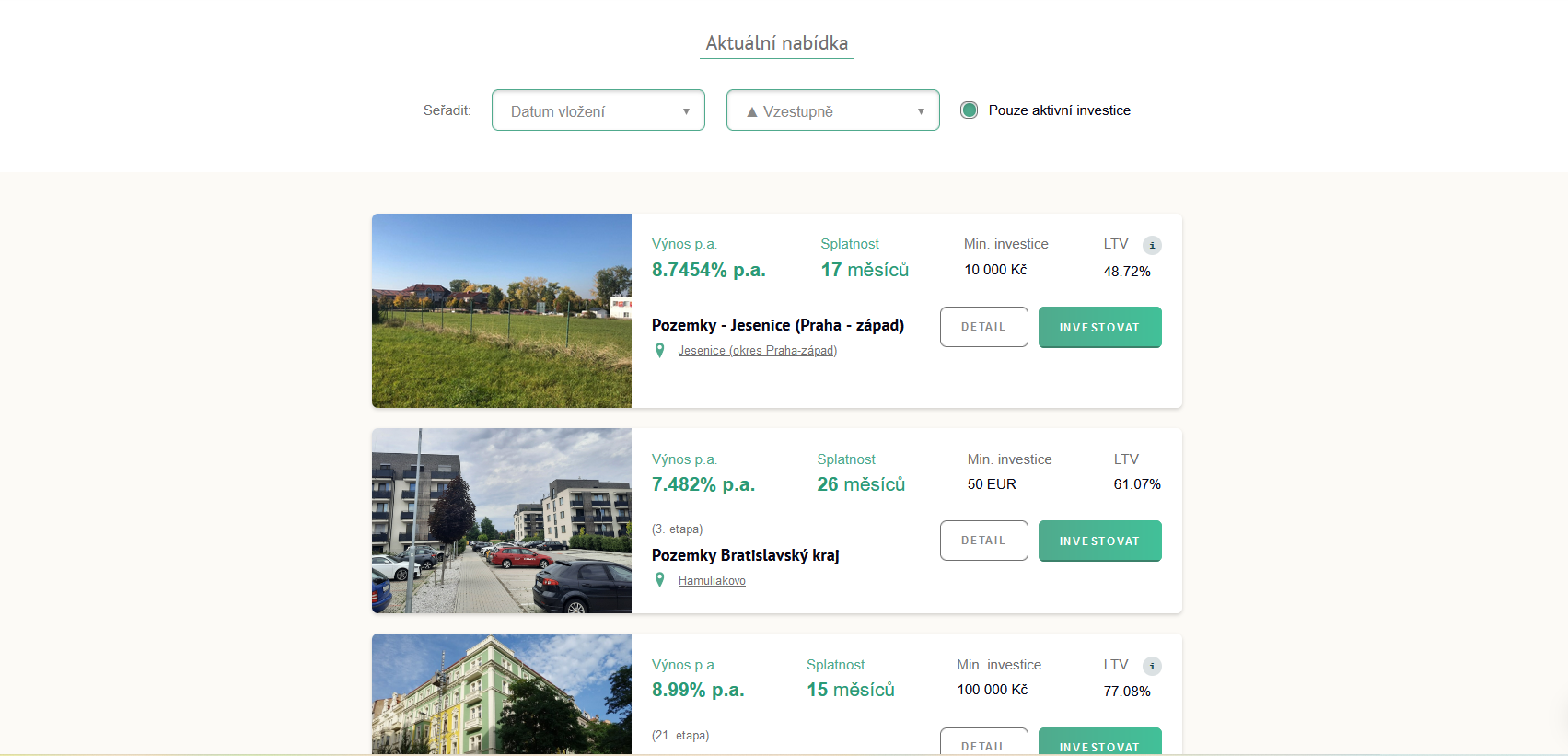
Upon logging in, you will be presented with the current list of available investment projects. You can easily compare these projects and click on the ‘Detail’ button to access more information about each one. Utilizing filters, you can also view previously closed projects or sort them according to your preferences.
In the top bar, you’ll find several tabs, each concealing different information.
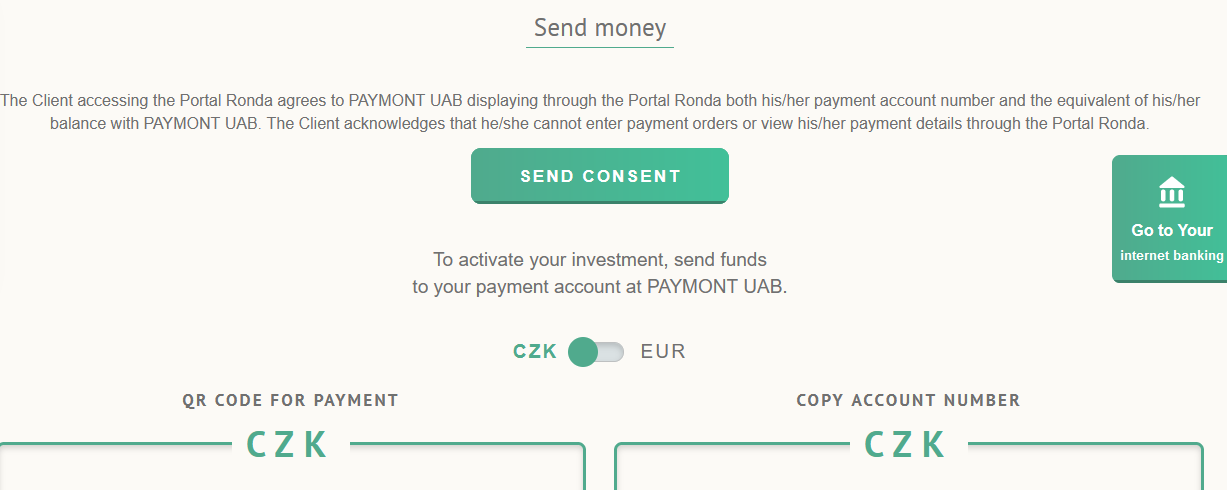
A preview of your CZK investments will be automatically displayed. If you have euro investments in your portfolio that you want to view, simply switch the button in the top right corner from CZK to EUR.
The “My Yield” tile shows the amount corresponding to the sum of yields from all active and settled participations, excluding any bonuses.
The “Diversification” tile either indicates that you have only 1 investment and should consider selecting another to reduce risk, or it presents a clear ratio of all your investments in a pie chart.
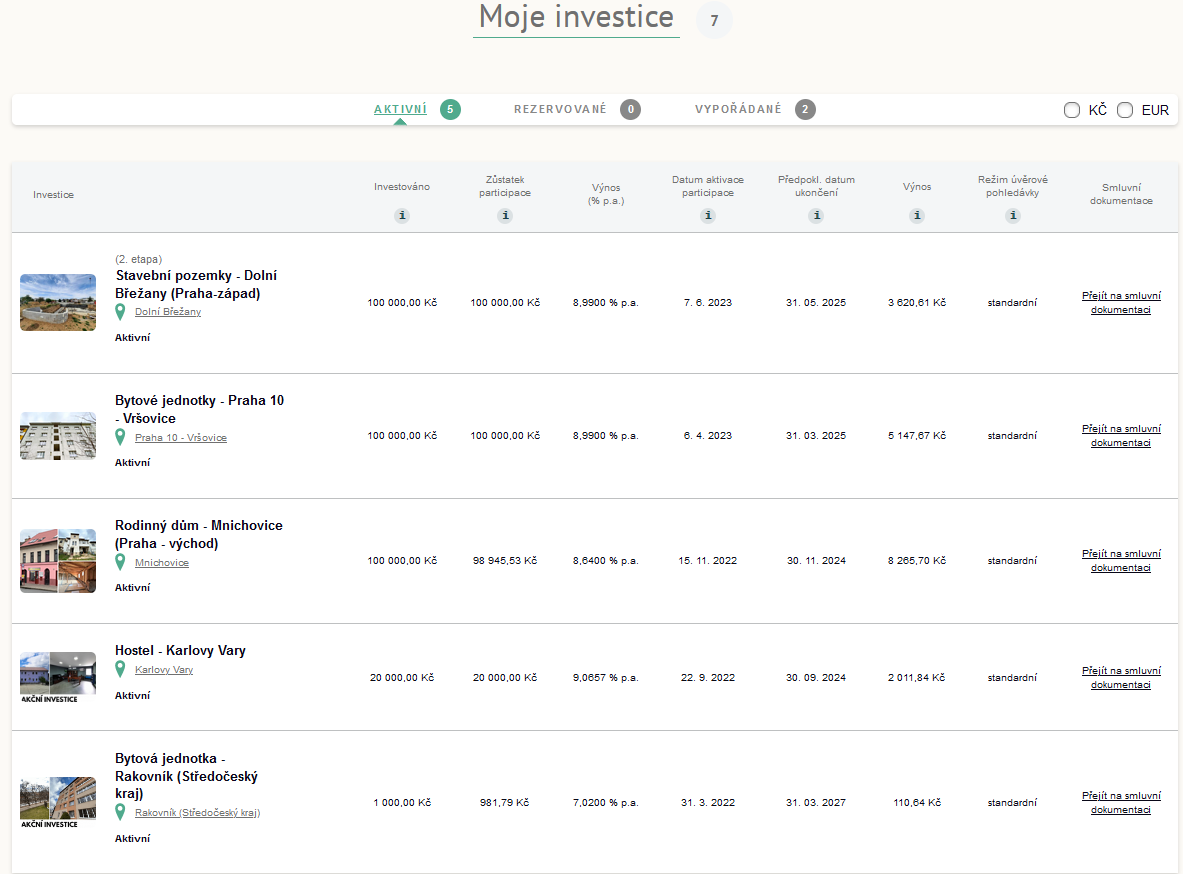
As you scroll down the page, you will find the “My Investments” section. This is a clear list of all your active, reserved, or settled investments that you can click through and review one by one. For each investment, there is an activation date and an expected end date. Once again, you can categorize your investments into CZK and EUR in the right-hand corner.
We strive to make the Portal Ronda as user-friendly and intuitive as possible. Your feedback is highly valued, so please do not hesitate to contact us with any inquiries or suggestions.

 Premium
Výnos

Výnos představuje peněžní částku, kterou získáte za investovaný kapitál. Udává rozdíl mezi konečnou hodnotou investice a použitým kapitálem.
p.a. znamená per annum, tedy výnos vypočítaný na roční bázi.
Příklad:
Investujete 10 000 Kč s výnosem 10 % p.a. Výnosy vám budeme vyplácet v poměrné výši každý měsíc, za rok na výnosech získáte celkem 1 000 Kč.
Splatnost
Splatnost udává závazné datum, do kdy bude úvěr splacen a kdy končí vaše investice.
Po tomto datu zašleme na váš účet spolu s posledním výnosem i původní investovanou částku.
Min. investice
Minimální investice udává nejnižší možnou částku, kterou lze do projektu zainvestovat.
LTV
LTV = Loan to Value
(v překladu „úvěr k hodnotě“)
LTV udává poměr hodnoty úvěru k hodnotě nemovitosti. Čím je nižší LTV, tím je vyšší zajištění.
Výpočet LTV = výše úvěru / odhad tržní ceny × 100

Ostrava

Výnos
Výnos představuje peněžní částku, kterou získáte za investovaný kapitál. Udává rozdíl mezi konečnou hodnotou investice a použitým kapitálem.
p.a. znamená per annum, tedy výnos vypočítaný na roční bázi.
Příklad:
Investujete 10 000 Kč s výnosem 10 % p.a. Výnosy vám budeme vyplácet v poměrné výši každý měsíc, za rok na výnosech získáte celkem 1 000 Kč.
Splatnost
Splatnost udává závazné datum, do kdy bude úvěr splacen a kdy končí vaše investice.
Po tomto datu zašleme na váš účet spolu s posledním výnosem i původní investovanou částku.
Min. investice
Minimální investice udává nejnižší možnou částku, kterou lze do projektu zainvestovat.
LTV
LTV = Loan to Value
(v překladu „úvěr k hodnotě“)
LTV udává poměr hodnoty úvěru k hodnotě nemovitosti. Čím je nižší LTV, tím je vyšší zajištění.
Výpočet LTV = výše úvěru / odhad tržní ceny × 100
Nitra - Mlynárce

 Akční investice
Výnos
Výnos představuje peněžní částku, kterou získáte za investovaný kapitál. Udává rozdíl mezi konečnou hodnotou investice a použitým kapitálem.
p.a. znamená per annum, tedy výnos vypočítaný na roční bázi.
Příklad:
Investujete 10 000 Kč s výnosem 10 % p.a. Výnosy vám budeme vyplácet v poměrné výši každý měsíc, za rok na výnosech získáte celkem 1 000 Kč.
Splatnost
Splatnost udává závazné datum, do kdy bude úvěr splacen a kdy končí vaše investice.
Po tomto datu zašleme na váš účet spolu s posledním výnosem i původní investovanou částku.
Min. investice
Minimální investice udává nejnižší možnou částku, kterou lze do projektu zainvestovat.
LTV
LTV = Loan to Value
(v překladu „úvěr k hodnotě“)
LTV udává poměr hodnoty úvěru k hodnotě nemovitosti. Čím je nižší LTV, tím je vyšší zajištění.
Výpočet LTV = výše úvěru / odhad tržní ceny × 100
Praha – Lipence
 KALKULAČKA

Výpočet kalkulačky vychází z modelového příkladu investice do jednorázově splatného úvěru (celá jistina splatná na konci splatnosti úvěru). Výnosy jsou investorům vypláceny měsíčně a kalkulačka nepočítá s jejich reinvestováním. Reálné zhodnocení investice se může od modelového příkladu lišit. Jedná se o hrubý výnos, který podléhá zdanění. U RONDY INVEST neplatíte žádné vstupní poplatky ani žádné pravidelné poplatky.